

-

Low Starting Quantity
-

Digital Proof Included
-

Design Support Available
-
In-House Production
Give every external hard drive a box that looks technically credible, keeps the device and accessories ordered, and makes your brand feel dependable from first view to lift-out. External storage buyers make fast judgments about compatibility, quality and care. A generic carton can leave a capable device feeling interchangeable, while a box built around the drive can communicate purpose immediately. Custom sizing, disciplined graphics, clear model cues and a well-planned interior turn the pack into part of the product story. That difference becomes visible on a retail shelf, in an online product image, at a business handoff or when a delivered order is opened. We help you shape that complete experience rather than simply print a logo on a stock box. Your structure, material, color system, surface details and interior arrangement can work together to support a practical technology brand, a refined consumer launch, an enterprise gift or a coordinated product family. Start with the actual hard drive, cable, adapter, literature and sales channel. From there, we can help plan the dieline, fit, insert route, exterior and interior artwork, finishing details and production path. Paperboard, kraft, rigid greyboard and supported corrugated formats are available, along with foam or paper-based inserts. Artwork checking, dieline support and a digital proof help connect the promise you want customers to see with the box approved for production.

Get Custom Quote
FORMAT & REVEAL OPTIONS
Choose a Box That Matches the Drive and Sales Moment
The right structure depends on more than the dimensions of the hard drive. A compact retail device may need clear model identification and quick access, while a desktop drive with a cable and adapter needs more considered weight distribution and arrangement. Ecommerce packs may require a branded corrugated format, while launch editions, executive gifts or enterprise kits may benefit from a rigid structure and slower reveal. Compare the routes below by device configuration, insert needs, sales channel and the impression the opened package should leave.
➜
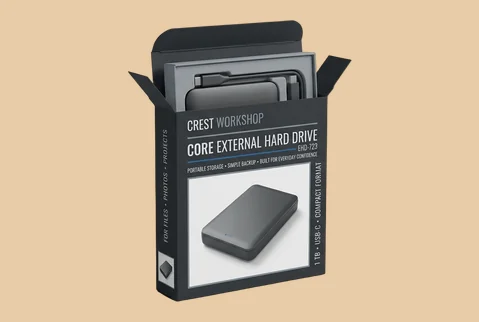
Tuck-End Retail Boxes
A clean folding-carton route for compact drives sold in retail, included in software bundles or supplied as branded business equipment. It keeps the pack efficient while giving every main panel a clear communication role.
- Single-drive or accessory bundle
- Shaped insert for organized fit
- Full-panel model and brand graphics
- Fast, familiar retail-box access
A practical choice when clear product recognition matters more than a ceremonial opening.
Customize Now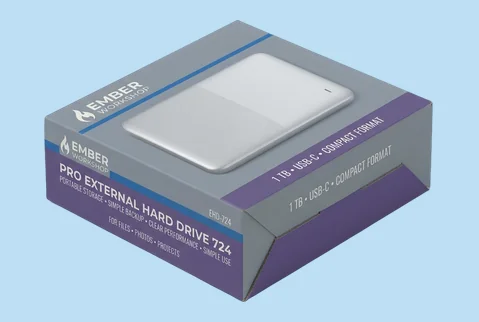
➜
Lock-Bottom Product Boxes
A reinforced folding-carton format for desktop drives, adapters or heavier accessory combinations. The stronger base supports a more confident physical presentation without moving directly into a rigid setup box.
- Drive, adapter and cable sets
- Structured base for added support
- Prominent technical and brand panels
- Suitable for retail or handoff
Choose this route when the pack needs greater substance while remaining compact and production-efficient.
Customize Now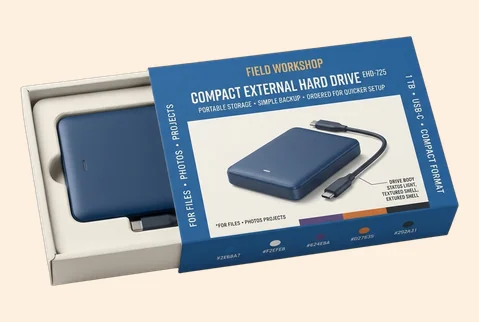
➜
Sleeve-and-Tray Boxes
A sliding tray creates a controlled reveal and gives the exterior sleeve a focused branding surface. It works well for portable drives, limited editions and compact technology gifts that should feel deliberate from the first movement.
- Single device or matched set
- Inserted tray with removal clearance
- Distinct sleeve and tray artwork
- Guided sliding-box reveal
This structure adds discovery without making the box feel oversized or unnecessarily theatrical.
Customize Now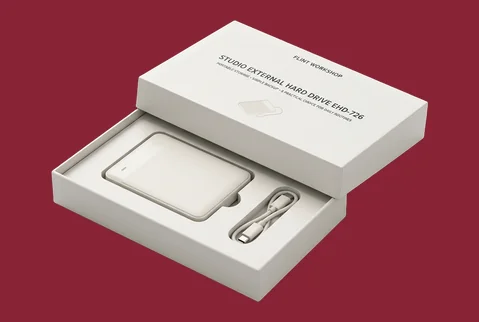
➜
Two-Piece Setup Boxes
A separate lid and base give the product greater physical presence and allow the device to appear as a considered purchase rather than a replaceable accessory.
- Portable or desktop drive sets
- Foam or paperboard insert route
- Exterior and interior brand continuity
- Lift-off presentation experience
Use it for product launches, executive gifting or technology packages that need a more substantial handoff.
Customize Now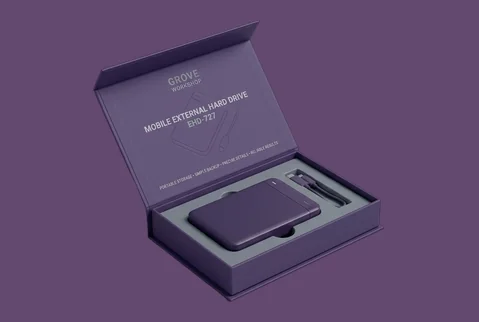
➜
Magnetic Rigid Boxes
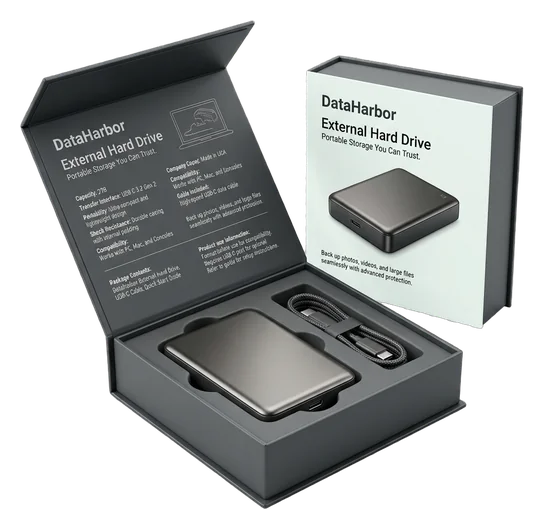
A magnetic closure supports a refined, reusable presentation for high-value devices, corporate programs and coordinated technology kits. The format provides room for structured arrangement and a measured opening sequence.
- Device and accessory combinations
- Custom foam insert possibilities
- Printed or wrapped brand surfaces
- Controlled hinged-lid opening
A strong option when the package should remain useful after the first product reveal.
Customize Now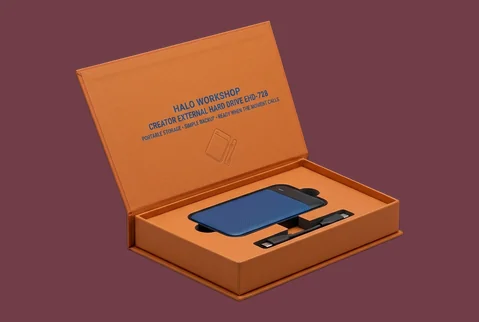
➜
Corrugated Mailer Kits
A branded corrugated mailer can carry the product identity into ecommerce delivery, subscription-style technology programs or multi-item business kits without resembling a generic shipping carton.
- Drive and supporting accessories
- Corrugated dividers or fitted inserts
- Exterior and inside-lid printing
- Delivery-ready opening experience
Choose it when receipt and opening are important customer moments, not merely transportation steps.
Customize Now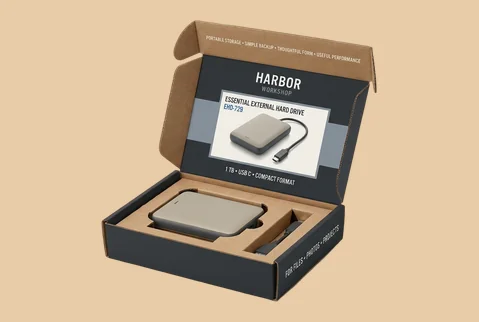
➜
Window Display Boxes
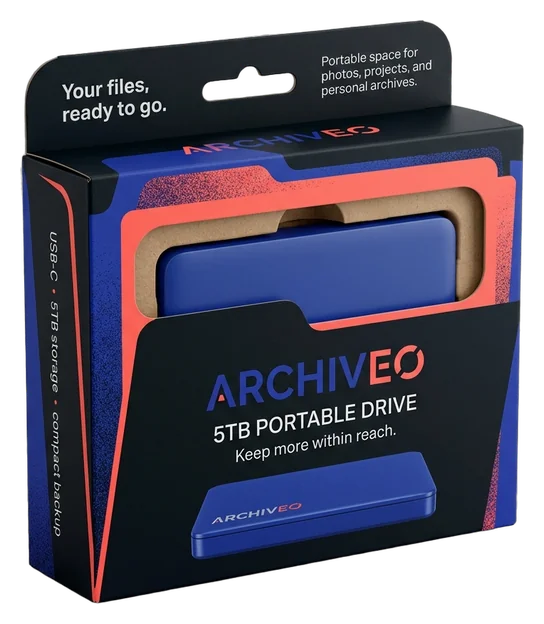
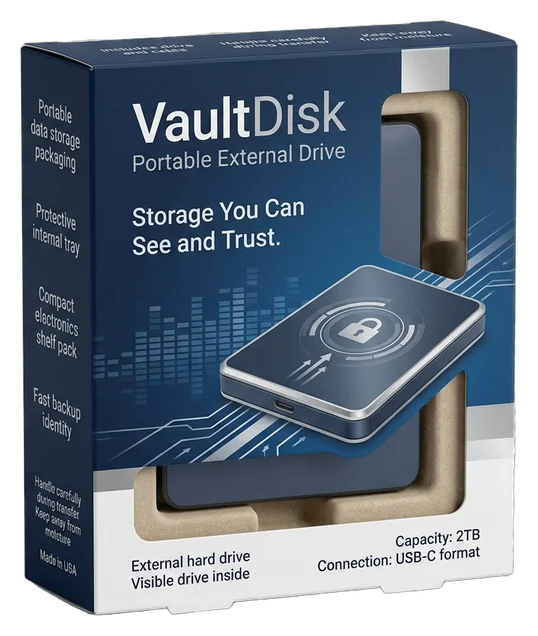
A die-cut window can make the device, its color or a selected surface visible before opening. The surrounding print should still explain the model and brand rather than relying on visibility alone.
- Visible device or selected component
- Inner tray for controlled placement
- Printed model and capacity hierarchy
- Retail comparison and selection
This route helps customers connect the physical product with the information printed around it.
Customize Now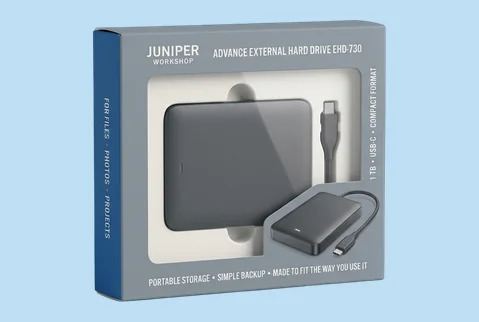
➜
Window Display Boxes
A die-cut window can make the device, its color or a selected surface visible before opening. The surrounding print should still explain the model and brand rather than relying on visibility alone.
- Visible device or selected component
- Inner tray for controlled placement
- Printed model and capacity hierarchy
- Retail comparison and selection
This route helps customers connect the physical product with the information printed around it.
Customize NowMATERIALS THAT SIGNAL TRUST
Build the Right Physical Character Around the Device
The material affects whether an external hard drive feels practical, refined, substantial or responsibly understated before customers study the specifications. Smooth paperboard can give capacity labels, product imagery and detailed graphics clean definition. Kraft can support a more direct, utility-led identity, while rigid greyboard gives launch editions and corporate sets greater physical presence. Supported corrugated material carries the same brand character into relevant mailer and kit formats. Select the board according to the product standard you want the customer to sense, not by thickness alone.
Smooth Paperboard for Clear Technical Communication

Paperboard supports crisp diagrams, model names, compatibility information and controlled brand colors. It suits retail cartons and compact product boxes where customers need to understand the device quickly. A smooth printed surface can make a growing electronics brand look organized and established without forcing the package into a luxury position that does not match the product.

Kraft for a Practical, Grounded Identity

Natural kraft creates a more tactile and straightforward impression. It can work for repair tools, field equipment, creator accessories or technology brands that prefer a less polished visual language. White ink, dark typography and selective color can make key information readable while allowing the natural board character to remain part of the identity.
Rigid Greyboard for Greater Product Presence

Rigid greyboard gives the pack more substance in the hand and creates room for a slower, more deliberate reveal. It is particularly relevant for executive gifts, launch editions, premium storage products or enterprise kits. Printed paper, specialty wraps and linen-textured materials can shape the exterior character around the intended audience.
Corrugated Board for Branded Delivery and Kits

Corrugated material suits mailer-style packaging, promotional technology kits and ecommerce formats where the shipping package also becomes the customer-facing box. The goal is not to imitate a commodity shipping carton. It is to give the delivered product an organized, branded arrival with enough room for the drive, cable, documentation and relevant inserts.
PRODUCT, MODEL & BRAND IN ONE VIEW
Turn Technical Details Into a Recognizable Product Story
Customers may compare an external hard drive by capacity, connection type, intended use and device family before they consider the company behind it. Custom printing lets those practical cues become part of a connected brand system. Give each capacity or model a distinct visual signal, keep the parent identity consistent across the range and use side, back or inside panels to explain what is included. CMYK, spot-color, digital, offset and relevant white-ink printing provide the production routes; the useful outcome is a product family that feels easier to understand and intentionally built by one brand.
- Distinguish capacities and model families
- Keep parent-brand cues visibly consistent
- Clarify included cables and accessories
- Carry graphics beyond the front panel
- Continue instructions inside the box
- Build launch or enterprise editions
SURFACE DETAILS WITH A TECHNICAL PURPOSE
Control What Customers Notice and Feel First
A technology box can look confused when every feature receives the same visual weight. Finishes should help customers notice the brand, model or defining product cue in the right order. Matte and soft-touch treatments can create a calmer, more controlled surface, while gloss can support energetic graphics or high-contrast product imagery. Foil, embossing, debossing and raised spot effects are most useful when they direct attention to a selected element. The aim is not decoration for its own sake; it is a surface that makes the intended quality of the device easier to read.
-
 Set the Overall Product Standard
Matte lamination can support a precise, professional identity, while soft-touch can make a launch or presentation edition feel more considered in the hand. Gloss may suit retail artwork that depends on brighter color, product photography or sharper contrast. The treatment should reinforce the product position rather than make every external hard drive look like a luxury item.
-
Give the Brand or Model Clear Priority
Foil, embossing, debossing, raised UV or spot UV can give a logo, model name or selected technical cue greater visual and tactile importance. These effects are strongest when used selectively. A clear hierarchy helps customers find the information that matters without making the pack look overloaded.
-
Separate Special Editions Without Losing Continuity
Enterprise gifts, creator editions, launch bundles and limited-color devices can use a change in foil, texture or surface contrast to feel distinct from the main range. Core typography, layout and brand elements can remain consistent, allowing the edition to feel special without becoming disconnected from the parent identity.


DEVICE, CABLE & FIRST REVEAL
Make the First Opening Feel Ordered and Reassuring
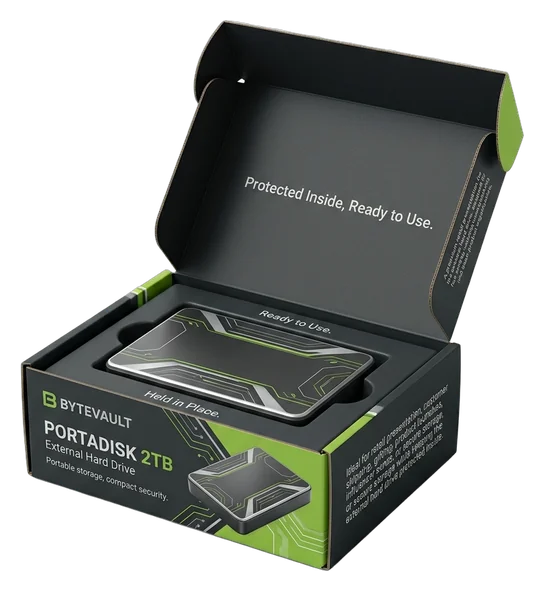
The exterior may establish technical confidence, but a loose drive, tangled cable or disconnected interior can weaken that impression as soon as the box opens. The inside should help customers understand what they received, where each component belongs and what to lift first. Printed internal surfaces can continue the visual identity, while foam, paperboard or corrugated inserts can separate the drive from cables, adapters and literature. The result is more than a tidy box: it is a clear introduction to the device and its supporting parts.
-
Continue the Brand Inside
Keep the Identity Moving Use relevant colors, graphics, short setup messages or inside-cover communication so the brand does not disappear when the lid or flap opens. The inside can confirm the product family, introduce the next step or provide a controlled visual background for the device.
-
Guide the Product Arrangement
Give Every Component a Clear Place Plan the insert around the actual hard drive, cable, adapter, case and printed material. Separate compartments can make the contents easier to understand and prevent the package from appearing loosely assembled. Foam, paperboard and corrugated insert options allow the arrangement to match the structure, product weight and intended presentation.
-
Reward the First Reveal
Shape What Customers See and Lift First Decide whether the drive, brand message or complete kit should become visible first. Appropriate removal clearance, finger access or a suitable ribbon pull can make lift-out feel natural. A well-planned sequence helps the customer move from opening to product use without searching through an unstructured group of parts.


EXPERT-GUIDED STORAGE PACKAGING
External Hard Drive Box Customization Made Easy & Fast — Built to Fit, Cushion & Ship Drives
Our external hard drive packaging experts, structural designers, print specialists, consultants, and project managers make custom external hard drive box ordering easy and fast by bringing your drive dimensions, casing shape, cable count, power adapter size, protective sleeve allowance, selected box style, artwork, and brand direction into one production-ready structure. We guide 2.5-inch or 3.5-inch drive fit, enclosure thickness, corner clearance, foam or molded-pulp insert tolerance, accessory compartments, corrugated or rigid stock thickness, retail hanger or shelf layout, coating and finish compatibility, barcode, serial, QR, warranty, and specification-panel spacing, dieline alignment, bleed and safe-zone setup, cost calculation, timeline planning, prepress preparation, and 3D proof review. The result is a custom external hard drive box that fits the drive, reduces movement, organizes accessories, carries technical artwork cleanly, and moves to production with fewer sizing, print, structure, or approval risks.
-
Fast
Specs-to-Quote Alignment
Experts align drive dimensions, selected box style, insert needs, accessory count, stock thickness, artwork, cost, timeline, prepress setup, and 3D proof early — helping reduce quote delays and approval back-and-forth.
-
Exact
Drive-Fit & Accessory Layout Review
We check portable or desktop drive size, enclosure thickness, cable count, power adapter space, protective sleeve allowance, corner clearance, and insert tolerance so the box fits the actual packed product.
-
Protected
Cushioning, Corner & Movement Control
Structural teams review foam, molded pulp, corrugated trays, corner pads, accessory cavities, and closure behavior so the drive and accessories stay better organized during retail, fulfillment, or shipping handling.
Plan a Hard Drive Box That Works Beyond the Mockup
A strong external hard drive box starts with practical information. The device dimensions, accessory arrangement, insert, sales channel and artwork all affect the structure. Our role is to help turn those inputs into a producible box that carries the intended brand impression through sizing, proofing and production.
-
Size the Box Around the Complete Product
Do not select dimensions from the hard drive name or capacity alone. Measure the actual device at its widest, longest and highest points, then identify everything that will be packed with it. This may include a protective case, USB cable, power adapter, printed guide, warranty card or promotional item.The final dieline should also account for the chosen insert, board thickness, product arrangement and comfortable removal. Where the product has rounded edges, projecting ports or an irregular housing, share a physical sample, accurate drawing or complete measurements so the structure can be planned around the real form.
-
Choose the Structure by Channel and Configuration
A compact retail drive may suit a paperboard tuck box, sleeve-and-tray format or window carton. A desktop unit with a power supply may benefit from a lock-bottom structure or a box with separate accessory areas. Ecommerce orders may use a branded corrugated mailer, while launch gifts and enterprise kits can justify a two-piece or magnetic rigid box.The best route depends on where customers encounter the product and what the box must hold. You do not need the same structure for retail, delivery, corporate handoff and media presentation unless one design genuinely serves all of those situations.
-
Plan the Insert Before Finalizing the Artwork
The insert affects the internal dimensions, opening sequence and amount of printable space. Foam can create defined cavities for the drive and accessories. Paperboard inserts can provide a lighter, print-compatible arrangement, while corrugated inserts may suit selected mailer and kit formats.Decide which component should be removed first and how much separation the cable or adapter needs. This prevents the interior from becoming an afterthought and helps the exterior promise continue when the box opens. Inserts can be developed with the box or as a separate packaging component.
-
Prepare the Dieline, Artwork and Approval Files
Dieline or template support is available, along with artwork checking, resizing and help with bleed and safe zones. Accepted production files include AI, PDF, PSD and EPS. Design support can help adapt your existing identity to the box, but the process should begin with accurate product information and the approved structure.Printing may cover the outside and relevant inside surfaces. CMYK, PMS or spot-color, digital and offset routes are available, with white ink on kraft where that treatment fits the design. There is no die or plate fee, and every approved order receives a digital proof. Production begins only after the required artwork and structure approvals.
-
Coordinate Multiple Models Without Losing Brand Consistency
Several capacities, colors or drive models can share one parent design system while retaining clear differences. Keep the logo position, typography and core visual language stable, then change the capacity cue, product image, color band or selected panel information.Multiple-design orders should be identified during quoting because every artwork version requires checking and production setup. Larger programs can also be planned for delivery to multiple addresses. When a job includes many low-quantity designs, the production schedule should be confirmed separately rather than assuming every version will follow the simplest single-design timeline.
-
Plan Quantity, Pricing and Production Timing
Paperboard, cardstock, kraft and supported corrugated boxes may start from 50 units. Supported rigid-box styles may start from 25 units, including relevant rigid formats with inserts. Starting at a lower quantity does not automatically remove meaningful customization; material, printing, finish and insert choices remain available where they suit the approved structure and production specification.Per-unit pricing generally improves as quantity increases, with more noticeable differences often appearing around 500 units. A physical prototype may be available for a qualifying bulk or wholesale project, and its cost may be adjusted into the resulting production order where approved. This is separate from the digital proof supplied with every approved order.Production normally takes 4–6 business days after payment, final artwork approval and structure confirmation. Production-ready jobs are generally planned to print and ship within 7 business days. Shipping transit time is separate, while complex multi-design orders may require a separately confirmed schedule.A complete quote should therefore identify the box style, material, finished size, quantity, insert, printing surfaces, artwork versions, finishes and destination. Giving these details early helps the team recommend a realistic structure and production path instead of pricing an incomplete specification.

HARD DRIVE BOX QUESTIONS
Answers Before You Size, Print and Order
Yes. The box can be planned around the actual drive, cable, adapter, case and printed material instead of forcing the product into a generic stock size. Provide the length, width and height of the device, along with the dimensions and arrangement of anything packed beside it. We will also consider the insert, board thickness and removal clearance before the dieline is approved. Exact dimensions should come from your product measurements, an accurate drawing or a supplied sample.
Yes. Foam, paperboard or corrugated inserts can give the hard drive and its accessories defined positions inside the box. The appropriate route depends on the product weight, box structure, accessory count and desired opening experience. Separate areas can be planned for the drive, USB cable, power adapter or literature so customers understand the contents immediately. The insert supports arrangement and controlled fit, but it should not be presented as a guarantee against every type of handling or transit damage.
The best style depends on how the product will be sold and what is packed with it. Tuck-end, lock-bottom, sleeve or window boxes can work well for retail products that need visible model information and familiar access. A branded corrugated mailer may suit ecommerce delivery or a drive-and-accessory kit. Two-piece and magnetic rigid boxes are more relevant for launches, enterprise gifts or presentation-led programs. Share the device configuration and sales channel, and the structure can be narrowed down before artwork begins.
Yes. A growing electronics business can start with packaging developed around its own product and brand without committing to a very large first run. Paperboard, cardstock, kraft and supported corrugated formats may start from 50 boxes, while supported rigid boxes may start from 25. Relevant custom sizing, exterior or interior printing, finishes and inserts remain available at these quantities where they suit the approved structure and production specification. This allows a smaller launch to look intentional rather than relying on a generic carton.
Yes. Printing can cover the front, back, top, bottom and relevant internal surfaces. The exterior can identify the model, capacity, connection type, compatibility or included accessories, while the inside can carry setup guidance, support information or a short brand message. CMYK, PMS or spot colors, digital and offset printing are available, along with white ink on kraft. The final information hierarchy should be reviewed on the dieline so important details remain readable after folding and assembly.
Yes. Dieline or template support, artwork checking, resizing and help with bleed and safe zones are available. Production files can be supplied in AI, PDF, PSD or EPS format. The team can help adapt your artwork to the approved box structure and check it before production. Every approved order receives a digital proof showing the prepared design. Review model names, capacities, contact details, colors and panel orientation carefully because printing does not begin until the required artwork and structure approvals are complete.
Production normally takes 4–6 business days after payment, final artwork approval and structure confirmation. Production-ready jobs are generally planned to print and ship within 7 business days. Shipping transit time is separate, so this should not be understood as guaranteed seven-day delivery. Orders containing many artwork versions, specialized structures or complex setups may need a separately confirmed schedule. Any expected timing difference should be discussed before the job moves into production.
A physical prototype may be available for a qualifying bulk or wholesale project. Where approved, its cost may be adjusted into the resulting production order. It is not an unrestricted free-sample service and should be discussed during quoting. For every approved order, a digital proof is available before printing. The digital proof confirms the prepared artwork, while a physical prototype is a separate option used when the structure, fit or presentation of a qualifying project needs closer evaluation.
CUSTOMER SUCCESS STORIES
Hear What Our Customers Say

As a small business, finding premium finishes in lower quantities was always difficult. Global Custom Packaging gave us the freedom to customize our boxes and create the distinctive, polished look we wanted without committing to a large order. We still work with them today and have expanded into multiple product variants, each with the same impressive presentation.
Jordan Blake
We sell online and in stores while regularly promoting at major events, running influencer campaigns, and launching seasonal collections. Thunder Packaging has become our dependable source for everything—from premium mailer and product boxes to sturdy influencer kits, rigid packaging, kraft boxes, and limited-edition Christmas designs. Whatever structure, material, or branded look we need, we no longer have to go anywhere else.
Avery Quinn

I never worry about how my packaging will look or whether my artwork contains typos, incorrect bleed areas, or other design errors. Their 3D previews and helpful design support give me confidence before printing. If the team notices a problem, they contact me, correct it quickly, and never charge extra for the assistance.
Cameron Reese
I’m really impressed with Global Custom Packaging’s precise, richly saturated printing and the accuracy of their die-cutting. The boxes were produced in exactly the right size, with a clean, well-formed structure and no fitting or construction issues. The finished packaging looked polished, consistent, and ready to represent our products professionally.
Morgan Taylor
I received my quote within a few hours, and once we agreed on the price, the designer responded quickly, completed the required changes, and prepared my artwork for printing. The 3D proof arrived promptly, allowing me to review everything and place my order that same day. My packaging was delivered on time, exactly as Global Custom Packaging had committed.
Harper Lane